Conversion Optimization Is Valuable

Conversion Optimization Is Valuable

 conversion optimization

The advertising industry is everywhere – it’s on your television, it’s on the internet, it’s in the mailbox, and it’s on your phone. Each message must compete for consumer attention. It must do so in an environment where many consumers have learned to block messages out. Supply and choice is bountiful, but demand remains limited by the size of the population, and by the average pay packet.

The consumer has a lot of choice.

In such an environment, we must make every visitor count. If we convert more visitors to paying customers, or encourage more to engage with us, we stand to be more successful than our competitors.
What Conversion Optimization Is Not

Conversion optimization is not just about e-commerce sites. It’s about all sites. When someone does something you want them to do, that’s a conversion.

Conversion optimization isn’t just about changing a landing page. It’s about looking at your entire approach, every step of the way. It’s about refining your offer to ensure it matches what people want.
Offer & Acceptance

We can make as many offers as we like, but we succeed when someone accepts our offer. Search engine optimization is mostly about the pre-offer and offer stages. We try and position a site against keyword search terms and achieve a high rank.

If we do our job well, visitors will click on our link and arrive on our page. For many search engine optimizers, this is where their job ends.

Unfortunately, if that is all we do, we are unlikely to create as much value as is possible. A significant part of the value chain depends on what the visitor does next. The visitor could click-back within a few seconds. They may not feel the page is relevant to them. They simply might not like the look of it. They may have been distracted or got confused.

Conversion optimization is a process that aims to prevent these events from occurring quite so often.
On Average, 97% Of People Will Leave Your Site Without Converting

Search engine optimization brings in many potential buyers, but few actual buyers. Your mileage may vary, but a rule of thumb is that conversion rates across the internet are around 2-3%, meaning only two or three visitors per hundred will take our desired action.

Where do we lose the 97%?

Think of the web sales process as a funnel, with the widest end being the search engine results pages, and the narrow end being your shopping cart sales success page.

As the visitors move down through the funnel, they are getting closer to taking a desired action, but they are dwindling in number. They dwindle to the point where we’ve lost 97-98%, on average, by the time the 3% reach the narrow end – the checkout, or the desired action.

Why do we lose so many?

We lose people because we’re not meeting the customers needs. Conversion rate optimization helps determine what those needs are so that we can shape our offers and content to our potential customers.

In so doing, we increase the percentage of visitors who convert to customers, and thus make more money with the same amount of traffic.
Desired Action

Desired action is an activity we want the visitor to take.

For example, if we run an ecommerce site, we want the visitor to buy a product. If we run a news site, we might want the visitor to click on an advertisement. If we run a non-profit site, we might want someone to sign up for a newsletter. Most sites have multiple desired actions. When we undertake conversion rate optimization, we try to figure out exactly what the visitor wants, and ensure they get it.

We want to ensure their desired action aligns with ours.
The Increasing Cost Of Traffic

Optimizing our conversion rates can take the pressure off traffic acquisition spends.

Search traffic is becoming harder to get, due to more competition and less predictable search algorithms. It’s becoming more expensive to get people to the start of the funnel, so it makes sense to try and widen the funnel so we convert more people once they arrive.

Conversion Optimization is not as easy as simply tweaking a landing page. Like SEO, conversion optimization is an ongoing, iterative process that involves trying things out, measuring, and adjusting in order to produce a desired result.

The difficulty comes in knowing what the customer really wants. An offline salesperson can tell a lot about a person just by looking at them. They can refine and reshape the offer constantly by asking questions and countering objections.

This is harder to do online, but using conversion optimization, we can emulate this process.
Measure, Analyze, Change

Consider your existing conversion rate. Figure out what you want visitors to do, and examine how many visitors are currently doing it. This is called the baseline.

Once you establish a baseline, conduct an analysis. Look at your stats as visitors move through your site to see where you are losing them. Look at areas they are most interested in, and least interested in. Aim to get a snapshot of the current activity on a site.

Armed with this data, we move to the optimization phase. We change a little at a time. We might change the offer, the copy, the graphics, and the site structure. In practice, we’ll likely change all four aspects. We experiment.

Some changes will work. Some won’t. Some will be negative and send us backwards! The important thing to understand is that it is a process, and that process is iterative. Always be testing, as even subtle changes can produce significant results.

Google experimented with 41 shades of blue before they found the color that users responded to best.
Conversion Is A Process

One myth concerning conversion optimization is that all you have to do is test one page against another and repeat until you find the winning page design. Perfect! Now, watch the money roll in!

In reality, this seldom works. It doesn’t work because there are many factors that go into a conversion.

The conversion process is a series of steps. If any one of those steps falters, then we can lose customers, regardless of how well the design of a given page has been tested. In order to find out the problems and opportunities inherent in each step, we must use a systematic, repeatable process.

Conversion doesn’t just happen at the end. People don’t just click “buy now” and hand over their credit card details. As we’re seen, only 3% of our visitors, on average, will get that far. What about the other 97%? We’re losing the other 97% at various steps in the process. Each step is an opportunity to optimize conversion.
Goals & Steps

It’s useful to map out every possible goal and step if only to test whether you should eliminate some!

For example, a sales cart process could look like this:
Visitor clicks on order button
Visitor is asked to create an account
Visitor is asked for name
Visitor is asked for email address
Visitor is asked for physical address
Visitor is asked for phone number
Visitor is asked for mobile number
Visitor is asked if they want to go on mailing list

I’m sure you’ve spotted one problem straight away. Why does the buyer have to create an account before they can make an order? Our hunch might be that buyers don’t like creating an account at this point.

In order to prove our hunch, we should watch abandonment rates at this point in the process. If we see high abandonment rates, we might create an option that allows the user to place an order without setting up an account. We then see if this change results in higher conversions.

The buyer might like a painless ordering system that lets them buy, then asks them where they want the item delivered. It’s a subtle distinction. We glean the same information, and can use this information to set-up an account, but we haven’t inhibited the purchase.

We should then think about what fields are really necessary. We may require all those fields, but we should also ask ourselves if they are strictly necessary. If so, are they strictly necessary at this exact point, or can they be derived later?
The Value Of Different Options

Each option a user takes will have a different business value.

If our aim is to collect email addresses in order to build a mailing list, then we might give the email field a high value relative to other options, such as a search field. We might repeat the request for the email address on various pages, or feature the form prominently, whilst making other options less frequent or prominent.

Some optimizers feel that we should only give the visitor one goal. For example, the goal of landing page X is to result in a sale. Whilst this makes it clear for the business, it may not work well for the visitor. If the visitor wants to research information before making a decision, we lose them if we don’t provide the visitor a path to find this information.

It’s similar to the way businesses use KPIs to help track their performance. KPI stands for Key Performance Indicator. KPIs help you define and measure your progress towards your goals.

You may have a goal to “make more money”. Let’s refine that a little and make it more explicit. “The goal is to boost revenue by $500K this year”. We then work backwards from this goal and work out the steps needed to achieve it. Each step must be measurable and quantifiable.

Each option leading to a goal can be stated in micro terms i.e. “we want 10% of people to click on the shopping cart button”, as we’ve determined that the more people who click on the shopping cart, the more likely they are to progress to the next step, which is to fill out their credit card details.

Goals will, naturally, differ depending on the type of site. In e-commerce,indicators of success or failure may include the number of conversions, order values, and checkout process abandonment rate. They could also include the number of purchases people complete off-line i.e come into your store as a result of researching on your website.

Subscriptions and advertising-driven sites will have different types of goals and values. They will likely measure the number of visitors, the number of page views, the number of subscribers, the number of subscribers who cancel and the average length of subscription. These values could lead to the same overall goal “to boost revenue by $500K this year”

Once defined, we know what we have to change to achieve our goals. We also have a means to measure the effect of the changes.
 

Introduction to Competitive Research

Introduction to Competitive Research

The key to doing effective, proper, and relevant competitive research is to look at who you are actually competing against.

There are a variety of ways to accomplish this and depending on your market and your goals it might make sense to introduce different tools for different purposes, but when evaluating competition in the SERPs for organic SEO I like to start with two of my favorite tools; Ahrefs.Com and SemRush.Com.

Tools cannot replace experience, foresight into where search or this particular SERP might be heading (think Travel, Credit Cards, Shopping, etc), and gut feelings but this process will give you a clear picture into who you are competing against and the hurdles you are likely to face.

So let’s say I’m competing in the organic coffee space. Maybe I want to start an actual coffee company, or build a resource site, or do something with private labeling, drop-shipping, or affiliate products. I usually grab the top 5 non-wikipedia sites for the core term and begin narrowing down my research there.

Some SERPs will have shopping inserts and a local result or four (in this niche anyhow) but generally the top 5 domains will give you an idea of who is doing a better job overall, who is trending up or down, and who you really need to go after to win in this particular market.

Before the research starts we’ll grab the top 5 domains ranking in Google for organic coffee:
DeansBeans.com
JimsOrganicCoffee.com
StrictlyOrganic.com
OrganicCoffeeCompany.com
GroundsForChange.com

You could really spend all day pulling reports for each site, combining and deduplicating spreadsheets, building your own charts, and so on but I think to look at top competing sites at a high level and allocate research time to the stronger sites I need to beat in order to make the organic SEO piece of my marketing a successful one.

When a few drops in positioning means going from double-digit percentages of clicks on the query to single digits it really drives home the point that you really need to rank in the top 2 or 3 for your core terms in order to fully realize a worthwhile ROI. While the SERPs are not an exact science, if you can identify the best performing site (or two) and design your strategy on beating them, your chances are exponentially better at success for a particular term.
Starting off with SEMRUSH

SemRush has a variety of tools that you can come back to for individual domain and keyword research but for now we are going to focus on comparing these domains to see who is the stronger organic SEO play.

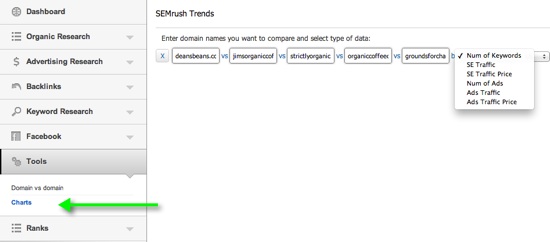
For organic comparisons you can start by heading right into their Domain Comparison features. Here, you can compare up to 5 domains for various paid search and organic search metrics. We’ll be focusing on the organic metrics:
Number of keywords ranking in Google
Overall traffic estimates based on ranking and estimated click rates by ranking position
Overall value of traffic (CPC data meshed together with volume estimates)


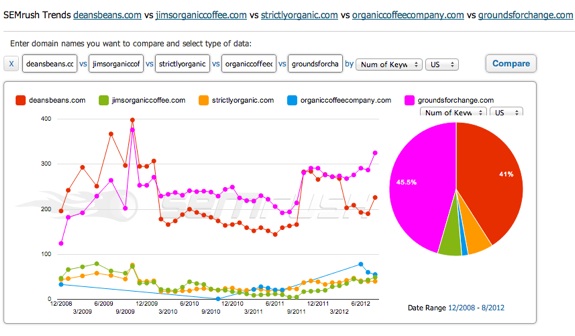
On comparison you can see that while the bottom few domains are trending up over the last year there are clearly 2 sites owning most of the space with respect to the overall number of keywords found ranking in Google.


You can hover over the smaller pieces of the pie to see total keywords and percentages when they are hidden given the small size of the pie. The next thing to look at is overall search traffic:


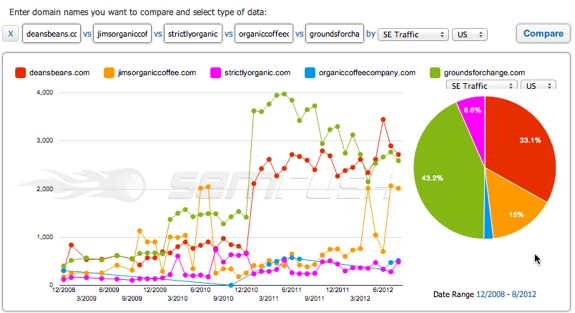
You can see where jimsorganiccoffee.com took about a 10 percent rip from deansbeans.com when compared to total keywords ranked for. This could be interesting because it could mean that Jim’s is ranking higher for keywords with more volume or it could mean that perhaps Jim’s benefits from more branded queries. This is something I would make a note of for future research.

We also have to keep in mind that some of these sites might sell additional stuff that we will not be selling; this will become clearer during additional research.

Next up is the last comparison piece in this section; the Traffic Value estimate (combining estimated volume and estimated CPC’s):


From here we can see that we should probably be concentrating our research on three of these domains. We still need to figure out where the spike in traffic and value is coming from off of jimsorganiccoffee.com but for now I would be comfortable limiting most of my research to these three sites.

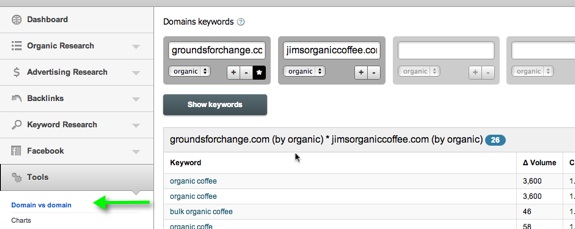
The other tool in SemRush you can use to compare domains is the Domain vs Domain feature.


Here, you can enter up to 5 domains and get common keywords that they all rank somewhere for. This is a good way to find organic keyword overlap but what’s really cool is if you click the asterik (in the image above) you can compare 2 domains and where each ranks for common keywords.

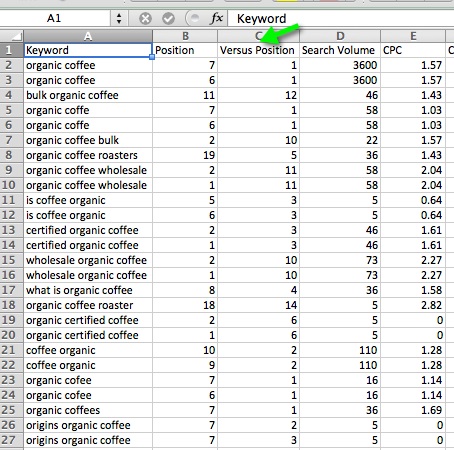
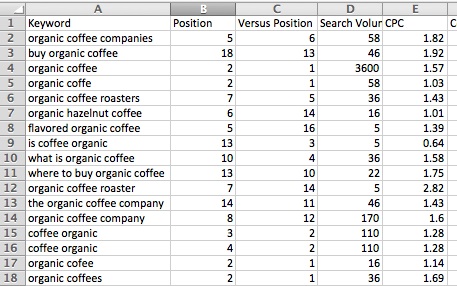
So, getting back to that jump in traffic and price for jimsorganiccoffee.com I compared it to both groundsforchange.com and deansbeans.com. Note that the domain that has the asterik icon clicked is the one that shows up in column B (Position) while Versus Position is the second domain (Jim’s in this case):

Compared to GroundsForChange.com


Compared to DeansBeans.com


So far, it appears that ranking number 1 for that core term “organic coffee” is a driving force behind those increases in traffic and traffic price from earlier comparisons.

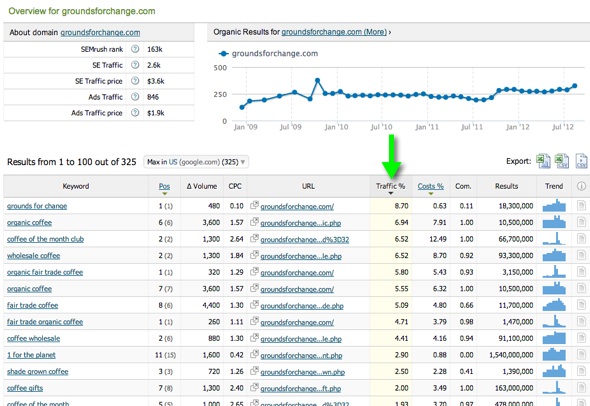
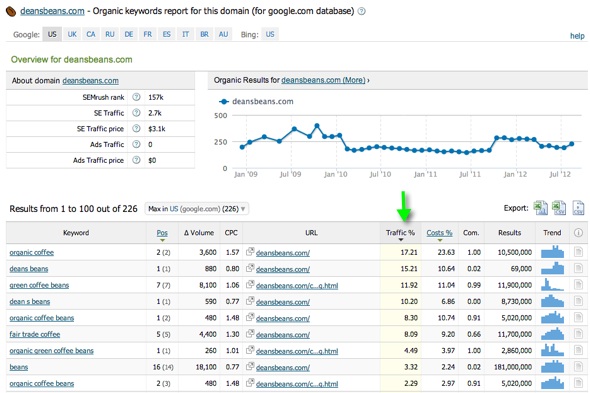
Breaking it down further, you can dig into each domain individually and see a better representation of their keyword spread:

GroundsForChange.com


DeansBeans.com


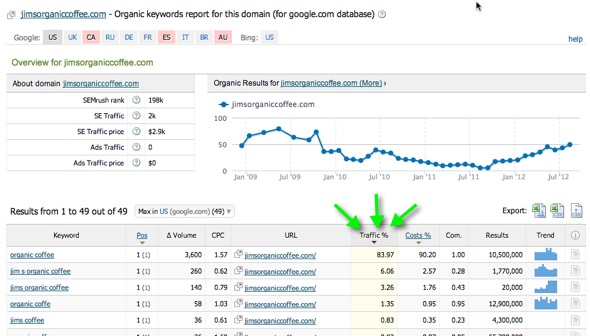
JimsOrganicCoffee.com


Clearly, we can see that Jim’s gets almost 90% of its estimated traffic from that core term and the next highest ones are branded. We will certainly keep this site for further analysis to try and see how that ranking was achieved but we also need to keep the other 2 as they rank for a much wider array of terms that probably matter to our site.
Bringing in Ahrefs.com

The usability of this tool, the depth, the freshness, and the additional features really make it my first choice for quick and relevant link analysis.

Ahrefs does a lot more than just pure link analysis. They have incorporated SemRush-like features into their competitive analysis as well as social data for given domains.

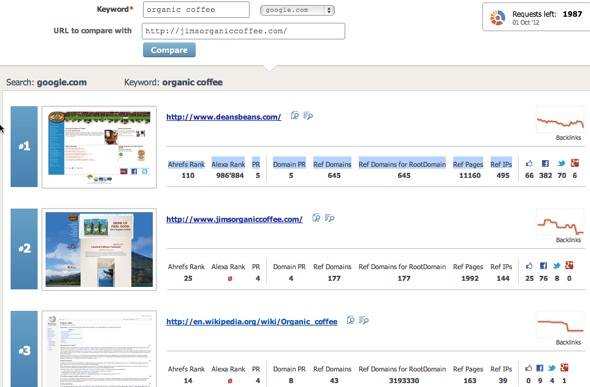
One place I like to start is the competition analysis feature. Here, you can see the following data points for the results in the top ten for a given keyword (in addition to comparing the result set to your chosen URL, jimsorganiccoffee.com in this case)
Ahrefs Rank
Alexa Rank
PR
Domain PR
Ref Domains
Ref Domains for RootDomain
Ref Pages
Ref IPs
Likes
FB Shares
Tweets
+1′s


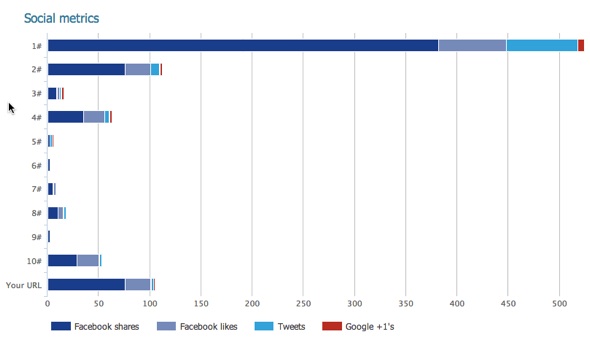
There are other charts similar to this which compare all of the above metrics in an easy to read bar graph format, for the sake of summarizing I’ve included the social metric chart:


In various ranking checks, DeansBeans.com and JimsOrganicCoffee.com flip flop between #1 and #2 and you can see where DeansBeans.com is way ahead of the pack in terms of raw metric counts (not so much in PR or various 3rd party authority formulas like referring IP’s, social data, root domains linking, and so on.

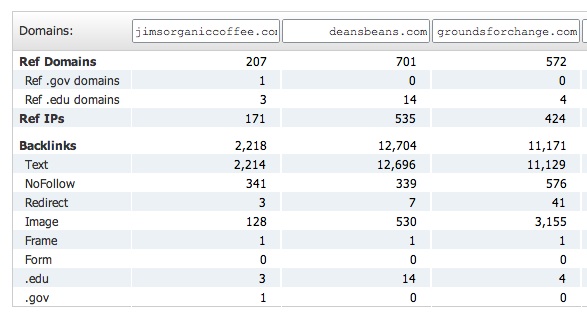
You can also go with the batch comparison tool in Ahrefs and see data for the specific entered URL (if a page is ranking instead of a domain for example) similar to the metrics mentioned above but also including a breakdown of linking edu’s, .gov’s, no-follow links, etc.

I like to use their domain comparison tool to get a quick raw count overview:


Jim’s is likely to be benefiting from having the keyword in their domain as well as probably having lots of natural branded links which also contain the target phrase.

Now, Ahrefs is a full-featured tool that is also very useful for ongoing research and for tracking linking patterns of competitors over time as well as tracking the effects of your own link building efforts. In this example, we are doing the initial competitive research on the potential competition so we need not use every tool they have. I do encourage you to test them out though, it really is an excellent set of tools.

Now that we’ve been able to see the lay of the land, it’s time to look at the individual backlink profiles of each competitor to check out quality and quantity of links and their corresponding anchor text break downs.

For these checks I like to go into their Site Explorer and check out a fresh view of the link profile.

For JimsOrganicCoffee.com I see this:


You can click the + button to see the linking domains for the phrase and they are pretty solid on top of being a very natural looking link profile.

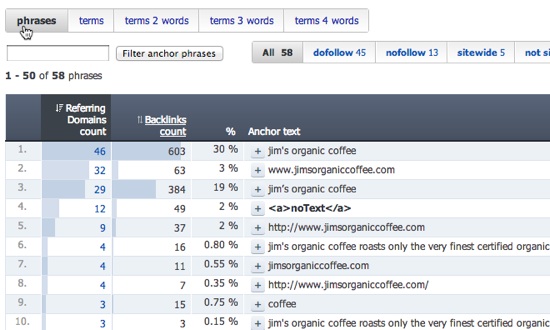
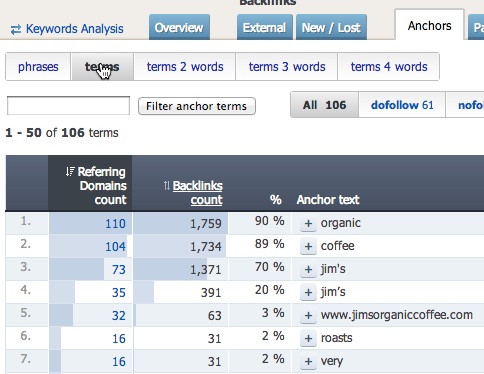
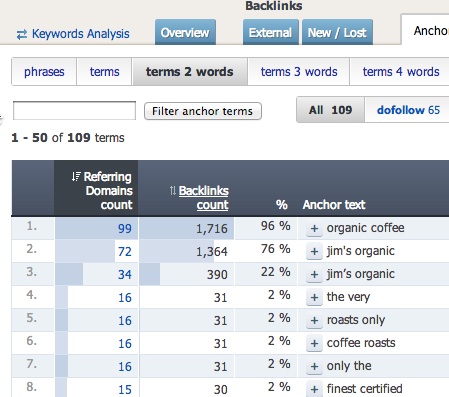
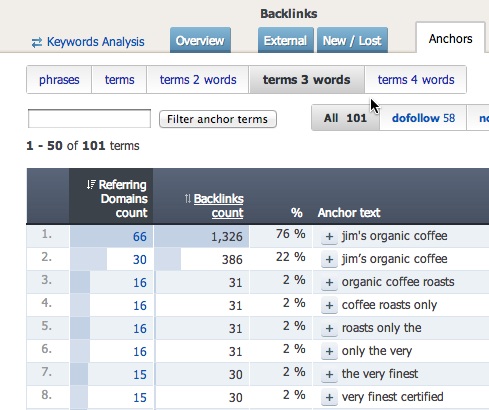
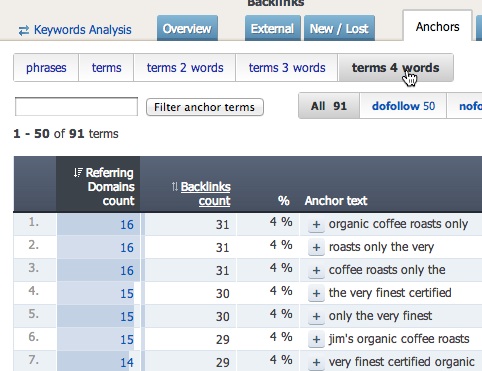
You can break down the profile further, into singular terms, 2, 3, and 4 term phrases in regards to the anchor text breakdown. This really helps get a good, high-level view of the anchor profile across the board. As you can see with Jim’s, it all appears to be very natural and the site is certainly benefiting from the partial exact match domain.
Here are the 4 profile reports for JimsOrganicCoffee.com:

<


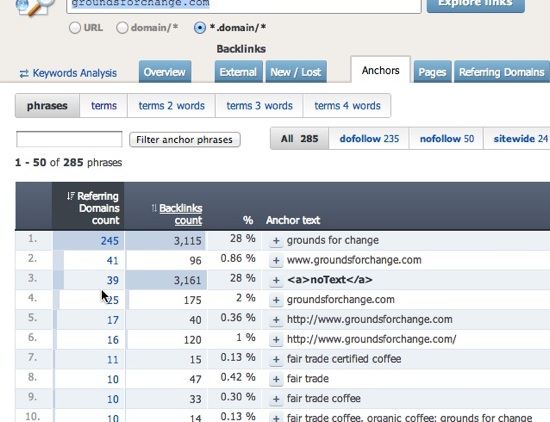
Breaking it down further, below you can see the anchor profile for DeansBeans.com and GroundsForChange.com. DeansBeans.com is certainly heavily weighted towards their brand name but since their brand doesn’t have the core keyword in it, while a competitor’s does, they are losing out on anchor text relevancy but their brand strength and shear link count/quality are making up for it.

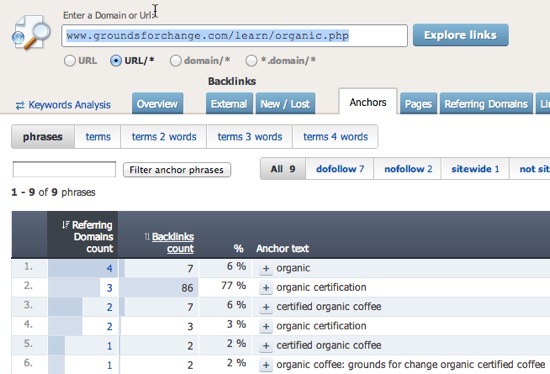
Also, GroundsForChange.com is more heavily weighted towards Fair Trade related keywords but their sub-page is ranking for the term we are looking at based on the strength of the overall domain (which is why we selected it for further analysis), a nice keyword rich internal link on the homepage (of a strong domain), and a targeted link profile for the ranking page:


Both tools here have keyword research and link components but I think to maximize the use of SEO tools by using the tool’s core strength.If cash flow is tight you can always rock one tool for this kind of initial analysis but using the tools properly should eventually pay off financially for you via your online marketing efforts.

You can dive deeper into each domain over time, as you compete with them for your chosen keywords, or during this research you might decide to go a bit more lateral and add more domains to the mix.

This is the general format I like to follow when conducting some initial, keyword-level competitive research. It typically gives me a rough idea (nothing is ever exact) of what I’m up against and how they got there, in addition to holes in their campaign where I might be able to pick up some additional wins.
 

Determined your Audience

Determined your Audience


If you’ve done everything right from an SEO point of view, your content should start to generate visitor traffic, views and engagement. Visitors will arrive via search engines, and any other site on which your content is hosted, such as YouTube.

If you’re lucky, this activity continues to grow as people discover your content, tell friends about it, and link to it. More likely you’ll see some traffic, but growth, if any, will be somewhat slow. This is why we need to actively market content. We need to adopt PR strategies. PR – public relations – strategies are mostly about networking.

It’s important to build, cultivate and grow a network of like-minded people as it’s much easier to spread your message far and wide if other people are prepared to do it for you. Given the popularity of tools such as Twitter and Facebook, building effective networks has never been easier.

Here are a few things to consider:

Be where your customers are: don’t expect them to come to you. You need to go where they are, and attract them to you. If your customers spend a lot of time on Facebook, you need to be on Facebook and engage with them there.

Go where your competitors are: if your competitors are posting on YouTube, you should be there, too. Check out their followers on Twitter. Make their followers your followers. Make a note of their most popular content, and their least popular content. Learn from their successes, and mistakes.

If You’re B2B, You need to be on Linked In: And even if you’re not, you still should be. LinkedIn is a professional network of contacts that is fast replacing the resume. It also includes, a place for the membership to ask and answer questions. Not only is this a great way to connect with movers and shakers, it’s a great way to see what problems people are having, and how they phrase and articulate those problems.

Forums & Blogs: Find the forums and blogs that relate to your niche. In the case of forums, sign up and participate.

It’s a great idea to publish thoughtful, valuable pieces on forums as a lot of forum posts tend to be low value. It’s not that difficult to stand out from the crowd. Such posts are almost always appreciated, not least of which by forum owners who typically encourage people to provide quality information, which in turn boosts the value of their forum. You’re giving away content in order to get in front of an established audience.

Likewise, adding thoughtful blog comments will get you on the radar of the blog owner, and readership, who may follow your links back to your site. Again, this is leveraging an existing audience in order to boost traffic to your own site.

A common practice is to guest post on someone elses blog, which is an even better way to get in front of their audience. Before you make an approach, be sure to study their previous posts and editorial policy as blog owners are unlikely to want off-topic posting. They will like the fact you’re offering them free content, but only if that free content is unique and of sufficiently high quality.

Forums and blogs are also great places to foster professional relationships. Typically, you’ll find like-minded and enthusiastic people, especially moderators and blog owners. Help them, and they’ll help you.

Giving forward works.

Press Releases – this is traditional PR activity, but can be a bit hit and miss. Use services such as PRWire to distribute your press releases. Remember to include links back to your content.

The value of press releases has been diminishing as social networks provide a somewhat richer, two way experience, but there is still a lot of traditional media who use press releases. Keep them relevant, targeted and interesting.

Email marketing – Email marketing is still powerful because people regularly use email. People have learned to block out spam, so your messages must be targeted, and relevant. Preferably, you should be building your own list from your site as this becomes a valuable database from which you can remarket to existing customers.
Rinse & Repeat

It’s tempting to publish, market, then forget.

Certainly, when it comes to evergreen content, your content may stand the test of time. However, content can appear stale over time, which is why we should adopt a regular maintenance schedule or audit.

Keep an eye on your top performing content and add to it and make it richer, where necessary, in order to keep it fresh. Nurture it. This doesn’t matter so much for less popular content, however non-performing content should be archived or moved down the hierarchy in order to re-focus attention on your your popular content.

One way to ensure content is performing well is to assign goals to specific content. For example, “our news section should have 1,000 email subscribers six months from now”. The goal should be aligned with a business requirement we know 3 in every 100 subscribers become repeat buyers, so we should devote resources to growing our email list”.

We could also devise engagement metrics, such as bounce rates, to see if people are reading our content, as opposed to just clicking back. If we’re getting a lot of traffic to a piece of content, but people click back at a high rate, it means we’re likely got our topic right, and our marketing right, but we haven’t followed through on the delivery. Look for any pieces of content that meet this criteria and look to revise content, as necessary.

These types of audits also ensure we stay consistent. Consistency is particularly important when it comes to brand. If people come to expect a certain level of quality from you, then the existence of low quality content may compromise your brand value and positioning. Either remove or improve such content.
 

Demonstrate Mastery

Demonstrate Mastery


Once you’ve decided on your niche, you should then demonstrate mastery. This helps establish trust, which leads to engagement. You will likely receive more links and have more people contact you than if you provide mediocre content.

It’s almost impossible to provide too much detailed information. In our wallpaper hanging company example, they might create a half hour video on wallpaper hanging, backed by ten articles outlining each step in detail. They show the tricks of the trade, the problem areas, and how to achieve the best finish.

Now, some people will consume this information and undertake the wallpapering job themselves. However, most people will see it as a demonstration of mastery, which builds trust, meaning they are more likely to call this company. The company has demonstrated they can do the thing they are selling – wallpaper hanging. This wouldn’t be nearly as effective if they just wrote a few hundred words of copy saying how great they are at wallpaper hanging.

The same goes for cooking shows. Most people who watch cooking shows don’t cook the recipes being demonstrated. Why not? Because people have other constraints. They may lack the time. They may have other things they need to do that have a higher priority. In the end, they watch the show, then go to a restaurant i.e they let the professionals do it.

Yes, you’ll always have those who do-it-themselves, but they were never really your customer anyway. If you didn’t offer this content, they’d just find it from somewhere else. However, our wallpaper company can still sell these people wallpaper hanging tools! After all, they’ve just shown them a video demonstrating how to use them.
 

Master Of Your Niche

Master Of Your Niche


Are you the go-to person in your niche? Are you one of the few go-to people in your niche? If not, then it’s going to be difficult to establish authority. Lack of authority will undermine a content marketing strategy as it’s only human to question if someone is worth listening to before we give our time to them.

There are many ways to establish authority. The hard way is to spend a lot of time challenging established competitors. An easier way is to go where there aren’t many – or any – competitors. One way to do this is to redefine your niche. Go more granular until you find some clear space.
 

Why Is Content Marketing Becoming More Important

Why Is Content Marketing Becoming More Important


The main advantage of content marketing is that it is enduring.

Unlike a PPC campaign, which stops when you stop paying, content can endure for many years. The cost of hosting content is almost zero, so there is little reason to delete it once created.
 
Evergreen content which means content that will always be relevant – can draw visitors many years after publication. For example, the activity “hanging wallpaper” doesn’t really change much, so if you wrote a definitive article and made a video on how to hang wallpaper, it will stay relevant over time. Contrast this with news, which has a short shelf life i.e. is useful only so long as it is new, before it’s replaced by more recent news.

Your content should also be engaging. The internet is changing rapidly from a top-down publishing medium to a relationship medium. You could just publish, and the reader could passively consume your content, however content can be made a lot more engaging if the reader can interact with it. Given the opportunity, they may comment on it. They may share it with their friends via social networks. They may write about it on their blogs. They may repurpose it and make something else out of it, and redistribute it again. This activity can make your content more usable and extend your reach. Viral marketing is based on this idea i.e. where one person takes a message and then spreads it, and then ten more people spread it, and so on. 


Write Types oF Content To Get SEO

Write Types oF Content To Get SEO


The internet is a rich, multi-media environment.

Use Google Keywords and search for categories of information relating to your niche i.e. wallpapering + video, wallpapering + photos, wallpapering + white papers. This way, you can gauge demand for each type of content before you create it.

Consider:

Video – creating video is getting easier and easier as cameras and editing software becomes ubiquitous. Video is particularly good for demonstrating procedures or for anything that is action oriented. Pay careful attention to lighting and sound as these areas can make a video appear cheap if done poorly.
Infographics – an info-graphic is a graphical representation of information. The London Tube map is a famous example of an info-graphic Today, marketers use info-graphics to draw attention by visualizing data.
 

Content Marketing for SEO

Content Marketing for SEO


What Is Content Marketing ?

Content marketing is a catch-all phrase to describe the use of content to attract people, convey marketing messages, and lead people to take a desired action.

One obvious example is a blog which provides content demonstrating our specialist knowledge in a given niche. We are sharing information, and we do so for free, however our underlying agenda is to engage people in order to sell our professional services or products, or our message.


Why Adopt A Content Marketing Strategy ?

Conventional marketing approaches, which may involve publishing sales copy, as seen in brochures, or on landing pages, don’t tend to provide information of high value. This type of content is usually a description or depiction of a service or product, and little more. It is disposable.

Content marketing is about creating and distributing genuinely valuable information, that remains valuable over time. It is less direct than conventional marketing, but can be considerably more effective, as many people are put off by low-value sales pitches.

In a sea of information noise, valuable content stands out. It gives us more opportunity to engage customers.

Content marketing can be cost effective. If we run a PPC campaign, we may budget $x per week, but we know that when the spend stops, so does the traffic. By contrast, if we spend the same amount producing and marketing a piece of content, we may receive ongoing visitors over time with little or no additional cost per visitor.
 

How Search Marketers Succeed

How Search Marketers Succeed

The complicated algorithms of search engines may appear at first glance to be impenetrable. The engines themselves provide little insight into how to achieve better results or garner more traffic. What information on optimization and best practices that the engines themselves do provide is listed below:

Googlers recommend the following to get better rankings in their search engine: 

Google 

  • Make pages primarily for users, not for search engines. Don't deceive your users or present different content to search engines than you display to users, which is commonly referred to as cloaking.
  • Make a site with a clear hierarchy and text links. Every page should be reachable from at least one static text link.
  • Create a useful, information-rich site, and write pages that clearly and accurately describe your content. Make sure that your <title> elements and ALT attributes are descriptive and accurate.
  • Use keywords to create descriptive, human friendly URLs. Provide one version of a URL to reach a document, using 301 redirects or the rel="canonical" element to address duplicate content.


HOW SEARCH ENGINE OPERATES

HOW SEARCH ENGINE OPERATES


imagine the World Wide Web as a network of stops in a big city subway system.


Each stop is its own unique document usually a web page, but sometimes a PDF, JPG or other file. The search engines need a way to “crawl” the entire city and find all the stops along the way, so they use the best path available links.


“The link structure of the web serves to bind all of the pages together.”

Through links, search engines’ automated robots, called “crawlers,” or “spiders” can reach the many billions of interconnected documents.

Once the engines find these pages, they next decipher the code from them and store selected pieces in massive hard drives, to be recalled later when needed for a search query. To accomplish the monumental task of holding billions of pages that can be accessed in a fraction of a second, the search engines have constructed datacenters all over the world.

These monstrous storage facilities hold thousands of machines processing large quantities of information. After all, when a person performs a search at any of the major engines, they demand results instantaneously even a 1 or 2 second delay can cause dissatisfaction, so the engines work hard to provide answers as fast as possible.


SEO strategies

SEO strategies

SEO strategies have gone through incredible amounts of evolution over the last year. From algorithm updates like Penguin and Panda to new search engine restrictions on overoptimization and spammy links, optimization methods for getting the best rankings in search engines all across the web have advanced. The recent power of social sharing has had a huge effect on search, and search engine company recommendations to get the best rankings in their search engines have changed as crawl tactics are getting smarter. SEOs of all levels have had to re-learn strategies and best practices to make sure their website’s SEO is set up for winning results.


Does the mountain of seemingly endless updates feel overwhelming yet? Have no fear, fellow Mozzers, because Roger and the SEOmoz crew have been hard at work creating a guide to serve as your one-stop-shop for the most current SEO trends. We’re proud to announce the release of our shiny new Beginner's Guide to SEO.

Our legendary first version of the Beginner’s Guide to SEO was read over 1 million times, but like all vintage models, it was in need of a makeover. The updated Beginner’s Guide to SEO is designed to describe all areas of SEO in regards to the advances in search over the last two years - from keyword discovery, to making a site search engine friendly, to link building, to marketing the unique value of your site’s offerings. We’ve highlighted new limitations and contributing factors to last year’s evolution of search along with our own suggestions to optimize your website for search success.


Google Adding Explanations to Knowledge Graph

Google Adding Explanations to Knowledge Graph

Google is adding explanations to Knowledge Graph panels, where applicable. The explanations, which appear when a user hovers over images in the “People also search for” section, offer more information on how two subjects are connected.

In the product announcement, Google uses the movie "Gone With the Wind" as an example. Hovering over icons people also search for, in this case "The Wizard of Oz", displays an explanation that Victor Fleming directed both movies.


It can also be used to indicate familiar or professional associations, as in the case of a search for actress Sandra Bullock. Keanu Reeves appears in the “People also search for” section of the Knowledge Graph panel for Sandra Bullock. Google now explains, “Sandra Bullock and Keanu Reeves both appear in The Lake House and Speed.”

“We’re starting by showing major co-starring roles between actors, movies, and TV shows as well as highlighting family connections amongst famous people in the Knowledge Graph,” Google engineer Golan Pundak explained on the Inside Search Blog. “These connections won’t show up all the time, but when there is an interesting explanation available, you can now see it at a glance.”

When Google launched Knowledge Graph in May, Engineering SVP Amit Singhal described the “People also search for” feature as “magical,” crediting this feature for some of his “most serendipitous discoveries.”

Knowledge Graph is part of Google’s mission to provide the information searchers seek on the SERPs page, or as close to it as possible.
 

professional bloggers

professional bloggers 


People who use their writing skills to earn a living by penning posts for websites may be a bit difficult to shop for. It seems like every time you get them a present related to their niche they feel inclined to relate the contents of the article they just wrote about how your gift is responsible for deforestation, how a hotter tech device is already on the market, or how the cosmetics you spent so much time picking out at the makeup counter have been tested on animals. In short, it can be nearly impossible to shop within their best known area of interest. But that doesn’t mean you can’t find gifts that are related to their love of writing. Here are just a few that are sure to leave them speechless.

Ergonomic items. Whether you select an ergonomic keyboard or spring for a pricy ergonomic chair, bloggers who sit in front of a computer all day might just declare their undying devotion to you for giving them the gift of comfort. These items are designed with the human body in mind and they’re meant to reduce aches and pains by creating proper posture and positioning the body for optimum comfort. So for the person that spends hours in a seated position with hands poised above the keyboard, there may be no better gift than one that is ergonomically designed.

Kindle Fire. Most bloggers like to stay up to date with pop culture, and this includes books, magazine, movies, games, music, and more. Providing them with a tablet that they can easily take to the coffee shop for a quick read or bring to their dentist appointment to watch a movie or listen to some tunes while they get drilled will allow them to “work” even when they’re off the clock.if you’re really feeling generous, go for an iPad instead. The price point on the Kindle is much lower, but the iPad will literally let them work from anywhere that has WiFi, and if you get the keyboard docking station, as well, they can even type on a full-size keyboard instead of tapping a touchscreen.
 

How to add multimedia to your blog

How to add multimedia to your blog 


Your blog is a great place to write about your life, discuss something you’re passionate about, and share ideas that are important to you. These days, a blog is also a great way to develop a career, or shore up an already established one. Your blog can be a great many things to you, but regardless of what it aims to do, your blog needs one thing and one thing alone if its to enjoy any kind of success at all: content. “Content is king,” as the saying goes, and this has never been more true. Visitors to your blog are going to want to read what you have to say…but only to an extent. As talented of a writer as you are, you’ve got to think about how many other channels of content the Internet is offering in competition with yours. To properly take advantage of the current Internet user’s attention span, your blog’s content has to be attractive, direct, and it must be dynamic. This means incorporating multimedia so your readers don’t get bored! Luckily, doing this is free in a lot of ways, and we’ll talk about some of the tools you have at your disposal when you want to start livening up your posts with some pictures or video.

Embed. Never Link.

Content you include on your site should feature its multimedia elements seamlessly, worked in as a natural part of the content. To achieve this, you’ll want to embed your multimedia content directly on the page. Simply providing a link to the multimedia content you want to include in your article will only result in your window getting closed. Don’t think for a second you’ll get a secondary click-through to the multimedia attached to your post. Your photos & videos should instead be included into the body of the text itself. You might be surprised at how often this mistake shows up.

Write Around Your Multimedia

In the same way that your content must be embedded into the actual code of your blog post, it must also be embedded into the text. Write around your multimedia in a way that indicates you’re aware of the medium and are using it consciously to enrich the content of your blog. Give a snappy lead-in to your photos, or introduce videos you intend to feature.

Optimize Everything

Plenty of resources are available online that can help you with the intricacies of a search engine optimization (SEO) campaign. A big part of SEO, however, is making sure all your blog’s multimedia is properly tagged. Go through all the meta information (look up how to do this in your blog provider’s support forums if you’re unsure) and make sure that you’re using your keywords in the meta description and other elements.

Captions

Another aspect of optimization is found in the caption, which is beneficial for this reason, as well as for reasons that tie directly in with the reader. A caption gives the reader something other than an image with which to connect, and also helps to draw the reader back into the written text you’re presumably going to have following the picture.


Google Rich Snippets Tool

Google Rich Snippets Tool

Google Rich Snippets Tool will help to you know that "how your website will be displayed in search results". Mostly SEO's who are familiar with Micro data will use this tool to test their RDF implementation across the website. Google has improved the UI of this tool with fresh and clean look.


We recommend to use Micro Data for your website at all possible areas which will in result helps Google to understand better about your website. E-commerce portals, Reviews websites, Business Listing directories should definitely have Micro Data for better results. Bloggers also should use author Micro Data for better visibility.


Basic SEO Tricks For New Blogger

Basic SEO Tricks For New Blogger

If you are new in the blogging atmosphere and your blog doesn't have sufficient amount of traffic then you are at right place to improve blog traffic. 4 basic things, which I would like to share, should be properly kept in mind while writing a new post for your blog. You can get huge amount of traffic in a very short time period If you apply these killing SEO tips to your Blog. These tricks are very simple and everyone can easily apply. You may even get thousand of visitors over night in some cases.So lets start to apply these tricks on the Blog.

Basic SEO Tricks For New Blogger:-

First of all, keep it in mind that neither any search engine nor any SEO tricks will give you a instant traffic if your content don't follow these specification.

  • Content should be genuine. 
  • Frequency of posting a article should be constant.
  • It should not be copied from other sites.
  • Content should be according to your audience taste.
  • Always write lengthy article greater than 300 words.

Don't forget to include heading tag ( h1,h2,h3) at appropriate position in blog post. While <h1> tag is most important among all these tag and should be included in the document once. Don't use <h4>, <h5> and <h6> tag in the post.

Whenever there is necessity to use anchor tag <a> or image tag <img> in post then don't forget to add alt attribute under these tag as search engine like those content which have sufficient amount of anchor tag with useful alt keywords so always think about alt attribute before adding a anchor or image tag in post. How to Add alt attribute in anchor tag or image tag .

Backlinks, also known as Inbound links or Incoming links, are incoming links from another website,blog or web page to your site. Search engine spiders gives maximum priority to the content which have greater number of incoming links.Following point should be kept in mind while creating a backlink.

  • Before creating a backlink, be sure the site is a legitimate directory. 
  • Never use any script or software to create backlinks.
  • Don't use reciprocal linking means link to me and I will link to you. Exchanging reciprocal linking is violation of webmaster agreement.
 

Google Search Quality Raters

Google Search Quality Raters

The new “Page Quality Rating Guidelines” section adds a whopping 32 pages to the handbook that Google provides to those human raters (via contractors like Lionbridge and Leapforce). An existing section on “URL Rating Tasks with User Locations” has been expanded from 12 to 16 pages, so that what was a 125-page document in early 2011 is now 161 pages long.

Version 3.27 of Google’s guidelines for search quality raters dated June 22, 2012 was recently leaked online. It’s actually one part of a larger leak that seems to have happened via private forums, and includes not only the rater guidelines, but also additional information and screenshots from some of the ratings tasks that the group performs. More on that later. Below, a look at the new section of the rater’s handbook, which was written about yesterday by Razvan Gavrilas on CognitiveSEO.com.


Google’s Page Quality Rating Guidelines

Here’s how Google explains the concept of Page Quality to its raters:
You have probably noticed that webpages vary in quality. There are high quality pages: pages that are well written, trustworthy, organized, entertaining, enjoyable, beautiful, compelling, etc. You have probably also found pages that seem poorly written, unreliable, poorly organized, unhelpful, shallow, or even deceptive or malicious. We would like to capture these observations in Page Quality rating.

Raters are asked to give each landing page an overall grade that might include Highest, High, Medium, Low or Lowest, but individual aspects of the page/document like “main content” and “layout” are also graded, as shown on this screenshot from the guidelines:-


Raters are told to ignore the location of the page when rating its quality and to avoid thinking about how helpful the page/document might be for a search query. “Page Quality rating is query-independent, meaning that the rating you assign does not depend on a query,” Google says. That’s because, the guidelines later say, queries help determine the overall utility of a page/document, but the purpose of a page helps determine its quality.
 

Use Google’s Search Results For Keyword Research

Use Google’s Search Results For Keyword Research

Years ago, on a planet far far away, people used to optimize for keyword density. But as relevancy algorithms have improved people have moved away from keyword density and toward keyword diversity. Covering a broader net of closely related keywords on your pages yields a better chance to rank for some of the billions of unique keywords searched for each month.

One of my favorite keyword research tools to use before hitting the publish button is the Google search results. At a glance, you can quickly see:

1.related keywords people search for

2.related keywords competitors are optimizing for

3.related keywords Google likes

Google Suggest

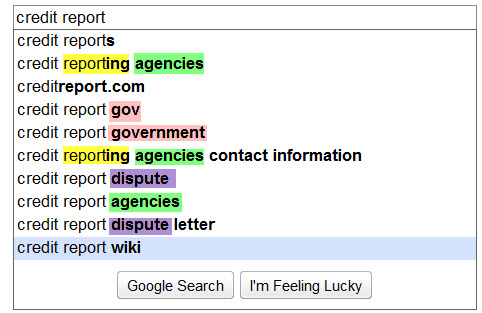
Google Suggest automatically tries to complete search queries to list other keywords that people search for which contain those keywords.

Notice on how the following 2 images there are some relevant patterns amongst the keywords. These are likely good keywords to.
include in your page title,

include in your page copy, 

use as inspiration when making more targeted deeper pages

And since these are keywords that Google is choosing to show end users you know that some people are searching for them, Google thinks they are relevant, and some people who see the suggestions will search for what is being suggested.


Google Suggest pulls in related search data on the fly, so you can easily compare common variations of the plural and singular versions of a keyword in only a few seconds.
 

MONEY WID CONTENT survey result in internet

MONEY WID CONTENT survey result in internet for all changes in past 10 years


the most about the Internet – and writing about it – is that I never know what is coming next. Just when I think the Internet could not possibly get any better, something else mind-blowing comes along and proves me wrong. When you compare the Internet’s progress over the last ten years, you will realise how many utterly cool things have been invented, and which have made their way into an indispensable part of our lives.


Why Optimize for Search Engines

Why Optimize for Search Engines 

Google’s worldwide reach at 1 billion unique visitors per month. Can your growing business afford to not be involved in this? We live in a great time where marketers can focus the attention of targeted interent users to your site and make them customers.

SEO has been shown to produce the greatest Return on Investment over time. A company that comes up high in search engine rankings looks professional and legit. If your site ranks high in the search engine results pages, people WILL click on your site and become customers.


How Does A Site Get Ranked

Search Engines rank websites based mainly on the quality and quantity of incoming links to that website. We make this happen. We write lots of content around your niche market and point that content back to your website. We write articles to many web 2.0 properties, we write and submit press releases, we post your site to hundreds social bookmarking sites. We find high page rank websites that are relevant and get your website in the conversation, we attack the web with an arsenal of content and links, giving the search engines no choice but to consider your website an authority in your niche market.

 It has taken years to hone this skill and come up with the best course of link building, and it is always changing. Part of our job is keeping up with the times so you can focus on your business and not what is happening in the online marketing world. We are your SEO and internet marketing consultants.

If your site is at least 1 year old you will see a traffic increase within a month. If your site is brand new it can take 6-9 weeks to begin to see results. This is because we need to build ‘trust’ within the search engines. SEO must be done in a linear and organic fashion to avoid looking like spam to the search engines.

the graphic below does a great job illustrating where your site will show up if you use SEO and where it will show up using SEM . The difference is that with SEM, your ad is featured and you will pay a fee every time someone clicks on it. With SEO it is an “organic” result that a search engine is showing because it believes it is relevant to the search phrase. There is no fee when someone clicks on an organic search result.


The bottom line is companies spend more on pay per click campaigns and recieve less return on investment when stacked against organic search engine marketing. With pay per clcik your campaign goes as far as your budget, with Search Engine Marketing you pay a fixed amount for a virtual endless supply of traffic.


SEARCH ENGINES Tricks

SEARCH ENGINES Tricks


Search engines are very different from subject directories. While humans organize and catalog subject directories, search engines rely on computer programs called spiders or robots to crawl the Web and log the words on each page. With a search engine, keywords related to a topic are typed into a search "box.

 The search engine scans its database and returns a file with links to websites containing the word or words specified. Because these databases are very large, search engines often return thousands of results. 
Without search strategies or techniques, finding what you need can be like finding a needle in a haystack.


To use search engines effectively, it is essential to apply techniques that narrow results and push the most relevant pages to the top of the results list. Below are a number of strategies for boosting search engine performance. When a "practice" link appears, click on the link to practice the technique with AltaVista's search engine.


Use Google Suggest When you enter the first letters of a keyword into the search bar, Google will suggest popular keywords other people have used in their searches. Follow these suggestions and see whether they can help you gain better results.now a days most search on iphone and ipod below you can see


If you can’t be bothered with manually typing operators, you can use Google’s Advanced Search. It allows you to exclude words, search for results in a specific language or specific files, and search within a site or domain. As you enter the details, the search query is automatically composed for you.


SEO advice to bloggers

SEO advice to bloggers


The SEO advice in this tutorial is designed to help those who want to understand search engine optimization and are willing to put in the time and effort necessary to do it right.

If you're looking for a quick ranking fix, easy seo tips, tricks, or magic, please exit to the left.

What you will not find here is spammy seo advice- such as the use of doorway pages, gateway pages, hidden text, hidden links, redirects, mirror sites, multiple domains, linking schemes or any other method of search engine spam. It's true that many misinformed webmasters and even some of your more irresponsible so-called SEO experts practice these kind of spam techniques. We don't and we do not recommend them because these techniques simply will not bring true website success and could get your site into big trouble with the search engines.

What you will find in this seo tutorial is good advice-  that will help your site become successful with the search engines and successful with your visitors. No, optimizing your site for true success isn't the easiest thing you'll ever do, but does success ever come easy If you are willing to learn and willing to put some real effort into your website over the next few months, this tutorial will help you become truly successful.

Search engine optimization- enters the scene. The search engines consider the 'best results' to be those that are the most relevant for the specific query. If someone is looking for red widgets, they strive to place the most relevant red widgets sites at the top of the search. Your goal is to make sure that your site is optimized so that the search engines clearly understand the relevance of your site for each of your chosen keyword phrases.

search engine optimization is understanding what the search engines want-.Consider this- Search engines like Google, Yahoo, and MSN want what we all want; happy users that return again and again to use our services. Since their service is providing search they strive to make their user happy by providing them with the best results possible, no matter the search query. Mind you, I m not suggesting that the engines always succeed in bringing us the best results but that is their goal none-the-less.

optimizing your website for success- relax, get a pen and paper to take notes, and follow along. If you don't have time now, go ahead - bookmark this tutorial, or add it to your favorites before you start browsing.
 

Promote a Blog on the Search Engines

Promote a Blog on the Search Engines

writing a blog on a regular basis, then you're well on your way to enjoying a respectable position on the search engines. However, in order to get the most traffic you can from your blog, you should take some time to make sure your blog is set up in such a way to make it easy for the search engines to find your entries as they "spider" (crawl) your web site. Also, you'll need to make sure that if they do find your content, that they index it in such a way as to help your users find you. If you're going to be spending hundreds of hours in front of a keyboard promoting your business, you might as well spend a few hours up front making those hours count. Someone accused Abe Lincoln of saying "If I had eight hours to chop down a tree, I'd spend six hours sharpening my ax". When it comes to blogging and search engine optimization, we think one hour in a hundred is more realistic -- especially if you spend those hours up front.

This is time well spent, whether you're writing a real estate blog or any other kind of business blog. I'll be focusing on real estate in the examples that follow, but the basic principles apply to any kind of Blog that you'd like to promote in the search engines.

first step

first step is to start thinking about your blog not as a catalog of your moods or a monument to your accomplishments, but a set of pages, with links to other pages.Then, while still making your blog interesting to your readers, you want to make the pages friendly to the search engines. Thinking about your blog as a set of pages and links is a good way to begin, since after all, that's the way the search engine "thinks" about it.

From a search engine perspective, the most important pages on your blog include your blog's home page and your individual post pages. And as we'll discuss in the next tip the most important links are those the search engine will follow and that will give the engine a hint about how to index the target page.
Though your home page and individual entry page are the most important pages in your search engine marketing plans, your category pages and your archive pages also have a small but substantial role to play. Each category page title is potentially another good keyword phrase, and both category and archive pages help your blog entries stay available to be spidered long after you've moved on to many new posts.


When you navigate to a post by clicking on a post's "permalink" link or the post's title,you want to see a static URL in the address bar of your browser. You want the static version not only because the search engine is more likely to follow a static link and index the page, but also because the static link repeats the title of your post again, and this helps it show up for the keywords you want.

The good news is, if you're using Blogger or Typepad, you probably have static links already set up by default. On Wordpress you'll need to check out the Wordpress help (Codex) for "permalinks" and follow the instructions there.


Watch a Titles

search engine perspective, the most important tag on your page is the title tag. The title of a page is what shows up in the blue bar at the top of your web browser window. My experience shows that your blog should be set up this way:


-Your blog's home page should show your Blog's Title, e.g. "Mytown Real Estate". Your blog's title should have the keywords a potential client would search for right up front. You want "Springfield Real Estate" (or maybe "Springfield Homes for Sale" or the like). Not "Edgewood P. Tuttle's Amazing Guide to the Sprocket City of Springfield".

-Each post page should have as a page title the title you entered for that post, and nothing else, e.g., "New Listing in Oak Park". It should not be "My Real Estate Blog : New Listing In Oak Park". If you have any control over your blog's appearance, avoid repeating the blog's title in your post title.

-Category pages should show the category title, e.g. Market Updates.

write your blog, try to write titles that match what you would search for if you were searching for real estate in your area. If you need help thinking about how people search, two great resources are Overture's Keyword Suggestion Tool and WordTracker.com.

Integrate Your Blog and Your Website

If you already have a real estate web site, I believe your blog should be integrated with your existing site as much as possible. That's where your listings and your lead generating forms are, or at least, I hope that's where your listings and your lead generating forms are. You want your visitors to go there, and you want the search engines to pick up the "internal links" to these pages as well. The best case is if your blog software runs on the same server and can use the same navigation elements, etc. Failing that, you may find a service that can match your web site's look and feel and host your blog externally.

If you can't run blog software on your server and you don't have much control over how your blog is configured, there are still some things you should be doing in your blog. First, make sure every page of your site has a link back to your web site . Second, if your site has been updated in any way, blog it! Did you take a new listing and is that listing on your site? There's a great blog entry for you.


SEO Tools for Website or Blog

SEO Tools for Website or Blog


Most of the SEO Professionals needs to send number of SEO proposals to new clients often. Also, they would like to have quick analysis on each website before sending the proposal.Top 3 free online tools which will help you to gain your search engine.

1.woorank


Download link 1

Download link 2


Increase Blog Traffic in this ways

Increase Blog Traffic in this ways


1. Write Well
Frequently updating your blog with useful content is the first step to building your blog's audience. The content you write is what will keep readers coming back for more. Make sure you have something meaningful to say to them and say it often to maintain their interest and keep them loyal.


2.Submit Your Blog to Search Engines


search engines such as Google and Yahoo! by submitting your blog's URL to them. Most search engines provide a 'Submit' link to notify the search engine of your new blog, so those search engines will crawl it and include your pages in their results.submitting your blog to search engines doesn't mean your pages will appear at the top of a Google search results screen, but at least your blog will be included and will have the chance of being picked up by a search engine.


Get in Search Engine with 7 methods

Get in Search Engine with some methods

-Creating Thin Content

I totally agree with this. Creating thin content is the major issue and content lacking any substance often comes up in Google searches. Eg. "Different people use different sunglasses. There are different types of sunglasses. They come in all shapes sizes and color.

 -Losing Your Voice Through Automation

Certainly any automated strategy is against the policies of not only Google but also Yahoo & Bing. This is what Google has to say about Automation
"Don't use unauthorized computer programs to submit pages, check rankings, etc. Such programs consume computing resources and violate our Terms of Service. Google does not recommend the use of products such as WebPosition Gold™ that send automatic or programmatic queries to Google.

-Ignoring Social Signals
It will be great if Greg can explain how "Ignoring Social Signals" fall under OLD SEO Method.

-Implementing Tactics without a Strategy
Wondering if OLD SEO methods involved implementing tactics without strategy.

-Focus on Rankings
Analysis of reports and rankings doesn't fall under SEO methods; However, I am against lengthy ranking reports or any other reports which eats up the time.

-Focusing on Google Only
Old SEO methods were not limited to Google, as Yahoo and MSN(Bing) had a considerable share in the search Industry.

The bottom-line is not to be carried away by misleading titles. Do your researches, every industry is different, If you are doing SEO for a celebrity, focus on Social Media. If you are working on an ecommerce site focus on Deal sites, Coupon sites, Social shopping and comparison shopping.
 

SEO PowerSuite includes Traffic

SEO PowerSuite includes Traffic


LinkAssistant
Finds link partners and helps establish and manage hundreds or thousands of high-quality links.

SEO SpyGlass
Finds all backlinks that your online competitors have, and helps build your own winnable linking strategy.

WebSite Auditor
Gives personal recommendations for making your website's content Google-friendly and increasing your chances to rank high.

Rank Tracker
Finds the most profitable keywords and monitors your site's positions in search engines over time.


SEO PowerSuite
for installation

SEO PowerSuite consists of four separate tools:
 

GET SEO FROM high traffic website

GET SEO FROM high traffic websites


Connect links with high traffic websites

the PageRank of the domain, affect directly both the total number of indexed pages of the website and the speed of indexation.Adding links from high traffic websites you can reduce the indexing time. This is because the more links a page receives, the greater the probabilities are to be indexed. So if you face indexing problems make sure you add your link in your blog, post a thread in a relevant forum, write press releases or articles that contain the link and submit them to several websites. Additionally social media can be handy tools in such situation, despite the fact that in most of the cases their links are nofollowed. Have in mind that even if the major search engines claim that they do not follow the nofollowed links, experiments have shown that not only they do follow them but also that they index the pages faster.


Use XML and HTML for sitemaps

Search Engines are able to extract the links of a page and follow them without needing your help. Nevertheless it is highly recommended to use XML sitemaps since it is proven that they can help the indexation process. After creating the XML sitemaps make sure you submit them to the Webmaster Consoles of the various search engines and include them in robots.txt. So make sure you keep your sitemaps up-to-date and resubmit them when you have major changes in your website.
 
 
Support : Creating Website | Johny Template | Mas Template
Copyright © 2011. SEO TRICK KEYS - All Rights Reserved
Template Created by Creating Website Published by Mas Template
Proudly powered by Blogger